Six flows, end to end, with every hand the work passes through named. Leave, a certificate, a payroll cycle, a missed punch, a vacant plantilla item, and the Personal Data Sheet.
Who touches what
Four kinds of account. Most of your agency only ever holds the first one, and holds it on a phone. What each kind cannot reach is enforced by the server on every request, not by hiding a menu.
Every employee
Their own record, on a phone.
Can
File leave, record attendance, claim expenses, request documents, read their own payslips, view and download their own Personal Data Sheet, browse the staff directory.
Cannot
See anyone else's payslip, personal sheet or records. Reach any HR administration screen at all.
Supervisors
Their own record, plus the people who report to them.
Can
Everything an employee can, plus decide the requests of their own direct reports and see a team list.
Cannot
Decide requests belonging to staff who do not report to them. Reach HR administration screens.
HR staff
The HR queues.
Can
Work document requests, feedback, the plantilla register, training and HR reporting, plus the Salary Register, the annual BIR filings, the contributions register and the executive dashboard.
Cannot
Open or run a payroll cycle. The runs themselves are walled off from general HR staff deliberately, and we test that they stay walled off.
HR management
The full HR function, including running payroll.
Can
Everything above, plus the payroll cycle itself — selecting employees, generating slips and disbursing.
Cannot
Escape the audit log. Every export and print is recorded against the account that did it.
Approvals fit your agency, in one of two arrangements
The machinery below carries four kinds of request — leave, expense claims, attendance corrections and shift changes — and it is configured to how your office actually works rather than to how ours assumed it would.
Two of the flows below decide elsewhere, and it is worth saying which. A document request is fulfilled by HR in a single step — no routing chain, and the stages your agency might want on one are configured at pilot rather than shipped. A selection board’s verdict is not routed at all: it is recorded exactly as the board gave it, because a board deliberates in a room and the system’s job is to hold what it decided rather than to re-decide it.
Simple
The supervisor sees the request and approves or rejects it. One step, done. This is what most offices want for leave and attendance corrections, and it is what most offices already do on paper.
Employee files the request
Supervisor approves or rejects
Decided. The employee is notified.
Routed
The request travels through named stages — your stages, with your names on the buttons. A request can sit at an intermediate stage where it is neither finished nor refused, and the employee sees that state described in words rather than as a blank or an internal code.
Employee files the request
Your first stage, under your name for it
Held between stages, described in words the employee understands
Your final stage
Decided. The employee is notified.
Which arrangement suits you is a question for onboarding. Offices with a division chief and an HRMO signing in sequence usually want routed. Offices where the immediate supervisor decides usually do not, and adding stages they do not need is how a system starts getting worked around.
The transactions that make up the year.
Each one starts where the work actually starts and ends where the record is written. Where a flow crosses into something we have not built yet, it says so on the flow rather than in a footnote.
01
A leave request, filed and decided
Your staff stop walking a paper form between three desks, and the record an auditor asks for is already written by the time they ask.
Employee
Files from a phone browser: leave type, dates, reason. Their current balance is on the same screen, so they are not guessing.
Dakila
Routes it to the right approver. The employee does not have to know who that is, and HR does not have to tell them.
Supervisor
Sees it in one approvals inbox, alongside expense claims, shift changes and attendance corrections. Not four queues. Opens it, sees who filed it, the dates and the reason, and decides.
Employee
Sees the decision in their own list and is notified in the app. Nobody rings HR to ask whether it went through.
Dakila
Posts the days to the cumulative CSC leave ledger — the running record of every credit earned and used, which is what COA asks to see, rather than only a remaining balance.
Monetisation is labelled an estimate everywhere it appears, with the CSC factor cited on the screen beside the figure. Approval routing and authorised amounts are your agency's to set.
A Certificate of Employment, requested and released
Nobody opens a filing cabinet, and nobody comes back a week later to ask whether it is ready yet.
Employee
Requests a Certificate of Employment and states the purpose. The form asks different questions depending on the document type — a travel authority needs things a certificate does not.
HR
Picks it up from the document requests queue, processes it, and releases it. One tracked loop, not an email thread.
Dakila
Generates the document from the employee's own record, so the certificate and the 201 file cannot disagree with each other.
Employee
Downloads the released document themselves. HR does not print it, sign for it, or walk it anywhere.
The year-end filings stop being a fortnight of rebuilding figures in a spreadsheet, because they are assembled from the payroll you already ran.
Payroll officer
Runs the cycle for the period. Semi-monthly means the first-to-fifteenth and the sixteenth-to-month-end split, not a rounded half.
Dakila
Computes GSIS, PhilHealth and Pag-IBIG on every slip, employee and employer share, with PERA as a standard line. Mid-Year Bonus, Year-End Bonus and Cash Gift appear by name, each on the slip for the period in which it is released.
Payroll officer
Changes an employee's salary and re-runs. Every contribution and the net recompute. Nothing is retyped, so nothing is mistyped.
Dakila
Produces the Salary Register and the Bank Remittance report out of that same run, which is why the two can never disagree.
Employee
Opens the payslip on a phone with year-to-date totals, and downloads it as a PDF without asking anyone.
HR
At year end, generates BIR 2316 per employee and the 1604-C alphalist — as a spreadsheet a finance officer can sum, and as the .DAT file in the required layout — aggregated from the slips already submitted.
Payslips / Jun 2026
Employee
Jun 2026
Bureau of Revenue Administration · Administrative Division
Submitted
Earnings
Basic salary
₱47,000.00
PERA
₱2,000.00
Deductions
GSIS personal share9%
₱4,230.00
PhilHealth employee share5% premium, shared
₱1,175.00
Pag-IBIGFlat
₱200.00
Withholding tax
₱3,487.40
Gross pay
₱49,000.00
Total deductions
₱9,092.40
Net pay
₱39,907.60
Mid-Year Bonus, Year-End Bonus and Cash Gift appear in their own periods.
Rendered in the product's own layout, not a screenshot. Statutory rates shown are verified against primary government sources. Salary amounts are illustrative and deliberately round — your agency's own schedule loads at onboarding.
Your agency's own NBC salary schedule loads at onboarding. We ship none. Step increments and the Notice of Salary Increment are built on engagement, because they depend on your rating cycle.
The monthly attendance record stops being reconstructed from memory at cut-off, and every change to it has a name attached.
Employee
Checks in and out from a phone. Built for a thumb, and geofenced against the shift's own location: inside an active shift window a punch from outside the radius is refused. Outside one, it is recorded as offshift and no boundary is checked.
Employee
Finds a day with no record, and files an attendance request — worked on duty or from home — rather than asking HR to edit the log for them.
Supervisor
Decides it from the same approvals inbox that carries their leave requests.
Dakila
Writes the approved day to the monthly attendance calendar with the approval trail attached to it. Who changed the record, and on whose authority, stays answerable.
Feeding your existing biometric terminals into this directly is built on engagement. It depends entirely on which terminals you own and what they can export, so we scope it against your actual hardware rather than quote it blind.
The question your agency head asks every budget season — how many funded positions are sitting empty, and where — is a screen rather than a week of collation.
HR
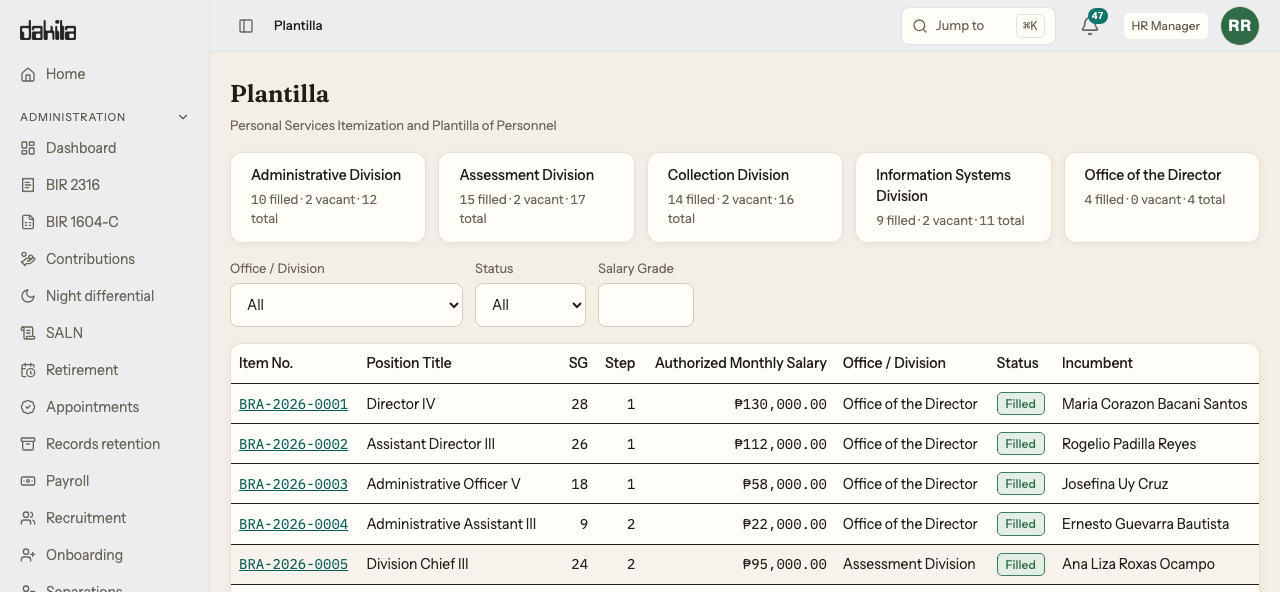
Opens the register and sees the item as vacant: item number, salary grade, step, authorised salary, and any Qualification Standards entered against it.
HR
Posts the opening and works applicants through the hiring pipeline in one place.
Dakila
Holds the board's verdict on whether each candidate meets that item's Qualification Standards — Meets, Does Not Meet or Undetermined — as the board recorded it. The board decides; nothing here evaluates a candidate.
HR
Runs onboarding to a checklist that ends in a real employee record, not a row in a spreadsheet someone has to transcribe later.
Dakila
Rolls the item up as filled — per office, and agency-wide, the way DBM asks for it.
The appointment layer is in the product today, on both CSC axes — every employment status against every nature of appointment, with the clocks each one starts, the documents each one carries, and the Commission's own actions on it including invalidation and recall. Reassignment, detail and designation ship alongside as the three personnel actions effected through an Office Order. What is built on engagement is the authoring: appointments are composed in the administration console rather than in these screens, and that composing workflow is the part that has to match your agency's actual practice. The appointment sheet names CS Form 33-A or 33-B — by your accreditation status — as the Commission's form it is transcribed onto, says on its own face that it is not that form, and declines to print while the status is blank. Nothing here certifies that an appointment is lawfully issued; that is the appointing officer's and the Commission's judgement.
The form your office retypes for every employee, every time it is needed, is entered once and printed on demand.
HR
Enters the CS Form 212 once — all eight sections, civil service eligibilities, family background, voluntary work, and the Q34 to Q40 disclosures. Not a subset. The entry is done in the administration console rather than in the screens below it.
Dakila
Holds eligibilities, training and voluntary work as structured records rather than free text, so they can be searched and reported on instead of read one file at a time.
Employee
Opens their own sheet from self-service and downloads the PDF, without asking anyone. Read access is ceilinged by role, so colleagues do not browse each other's disclosures.
HR
Prints the faithful four-page CS Form 212 that a CSC reviewer recognises — and it was checked by a person opening the file and reading all four pages, not by a test confirming a file appeared.
Worth being exact about which screen does what. The sheet is entered and corrected by HR in the administration console; the screens an employee reaches are their own record, to read and to print. Employees editing their own sheet from self-service is on the roadmap and is not in the product today, so a correction still goes through HR.
The system saying no, which we test as carefully as the system saying yes.
Every flow above has a shadow: the same screens, reached by someone not entitled to them. A vendor will happily walk you through an approval. Ask to see a refusal.
We sign in as an ordinary employee with no HR role and type the direct address of each administration screen in the product’s navigation — payroll, recruitment, separations, the plantilla, the executive dashboard, the BIR forms. For each one we check three things, and all three have to hold.
The refusal is explicit
A clear message that you are not permitted. Not a blank screen, not a spinner that never resolves.
The refusal offers nothing
No New, no Refresh, no View. Nothing clickable around the message. A refusal with a live button on it is a finding, and an important one.
You are not bounced
The screen still identifies itself as the one you asked for. Silently sending you elsewhere hides whether the refusal happened at all.
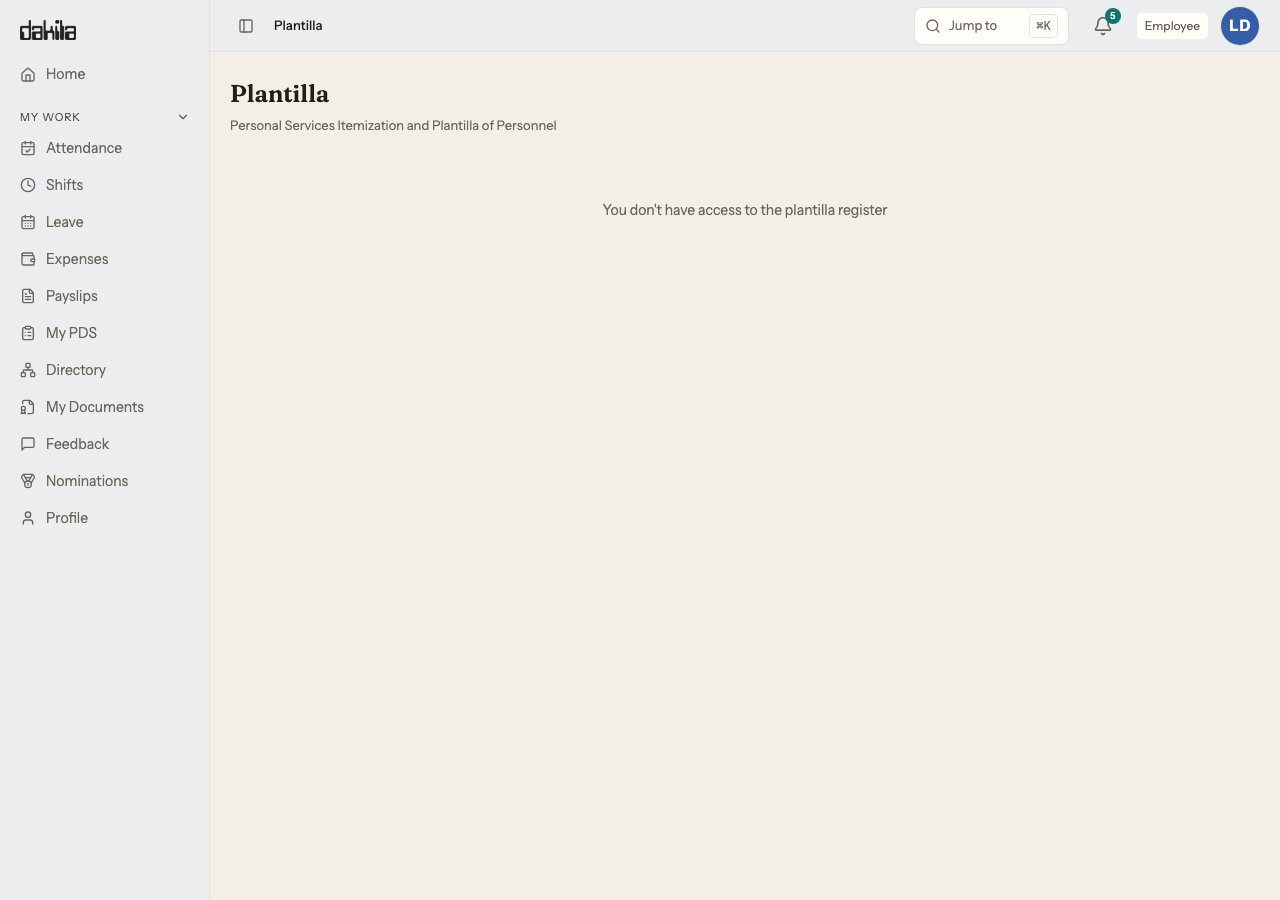
Each pair below is one address opened twice. The first image is an account entitled to the screen. The second is an ordinary employee typing that same address directly. The second image is meant to be empty — that is what the wall looks like from the inside.
The plantilla register, twice. Above, an HR Manager: sixty items across five offices, with incumbents and authorised salaries. Below, an ordinary employee typing that same address — no Administration section in the navigation, nothing in the page body to act on, and still the plantilla page by its own topbar and page header.
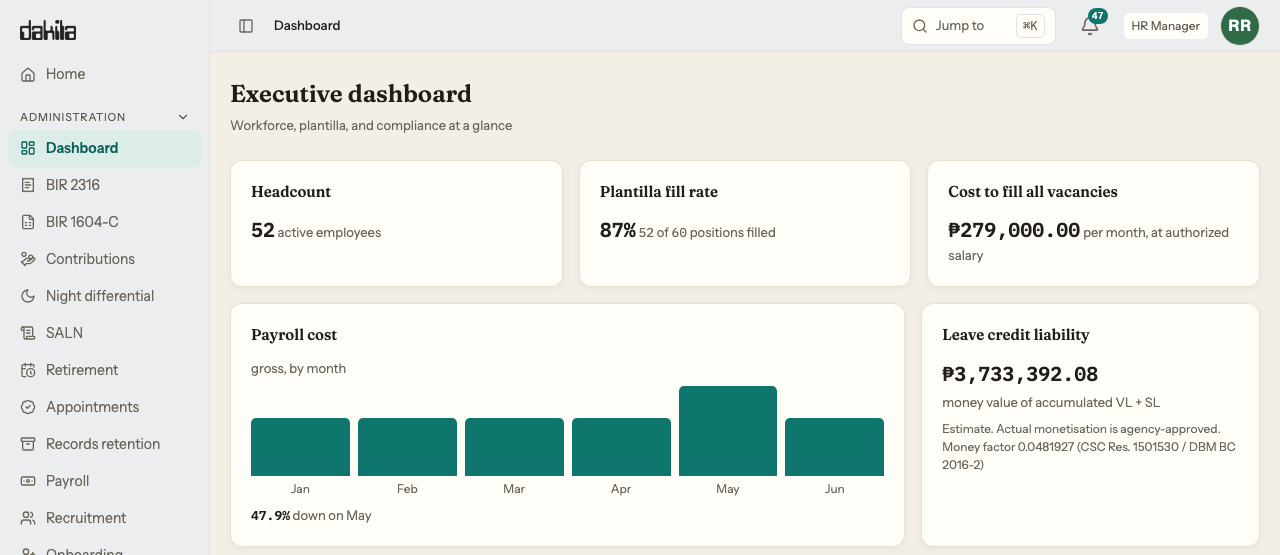
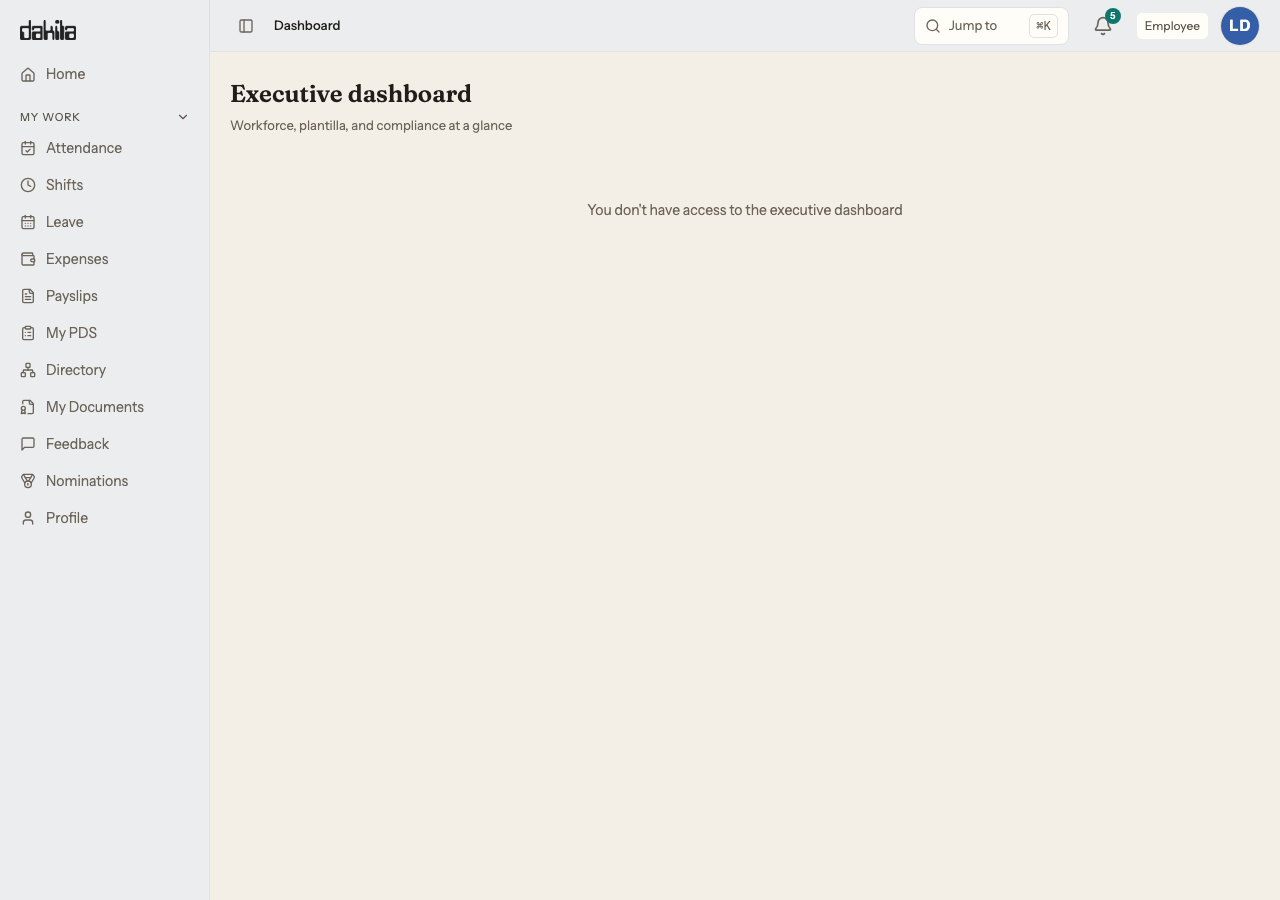
The executive dashboard, twice. The same headcount an agency head asks for, and the same screen returning nothing to the employee sitting under it.
The screen also refuses the person allowed in.
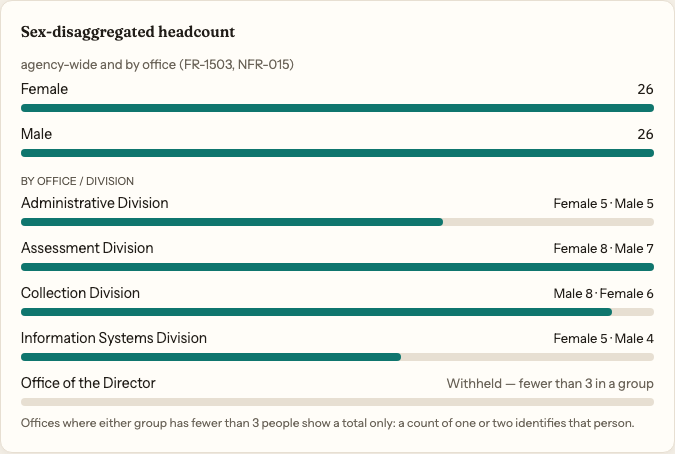
A sex-disaggregated headcount is a standard ask, and on a small office it is also a way of naming someone. Where either group in an office is under three people, the breakdown is withheld and the office shows a total only. The account looking at this is the HR Manager, who may open any of those records one at a time.
Four offices break down. The fifth is four people, so it does not, and the card says which rule stopped it rather than leaving a gap.
We run the same sweep against HR accounts for the payroll screens, because payroll is walled off from general HR staff and a wall you never test is a wall you are guessing about. Findings from that sweep are written down with their severity and fixed before release.
A walkthrough runs about half an hour on a fictional bureau with a full plantilla and a live payroll cycle. If one of the six above is the one your office fights with, say so when you request and we will have it open.